
Considering a mortgage or loan but worried about your credit history? Check out this guide on verifying your BI checking status both online and offline.
Understanding how to check BI checking, now officially called the Financial Services Information System (SLIK) OJK, is essential before applying for a bank loan. This service essentially records a detailed credit history of prospective borrowers.

Nevertheless, if you have ever missed a payment on a paylater service or credit card, checking your collectibility status is crucial to ensure that your mortgage, vehicle loan, or business capital loan applications are not unilaterally rejected by the bank.
So, what’s a convenient way to check BI checking and how do you interpret those credit score reports? Let’s dive into the comprehensive guide below!
Why Checking BI Data Matters
Checking credit status is not only a mandatory standard operating procedure for banks but also a preventive measure for prospective borrowers. Here are reasons why this information is valuable for both parties:
For Borrowers (Debtors):
- It simplifies and speeds up the credit analysis process.
- Provides a comprehensive view of the customer’s banking financial history, including personal data, loan limits, and penalties for any past violations.
- Gives precise information about collateral status and details of credit guarantors.
For Debtors (Creditors/Banks/Financial Institutions):
- It simplifies and speeds up the credit analysis process.
- Provides a comprehensive view of the customer’s banking financial history, including personal data, loan limits, and penalties for any past violations.
- Gives precise information about collateral status and details of credit guarantors.
How to Check BI Data
1. Checking BI Data Online (via iDebKu)
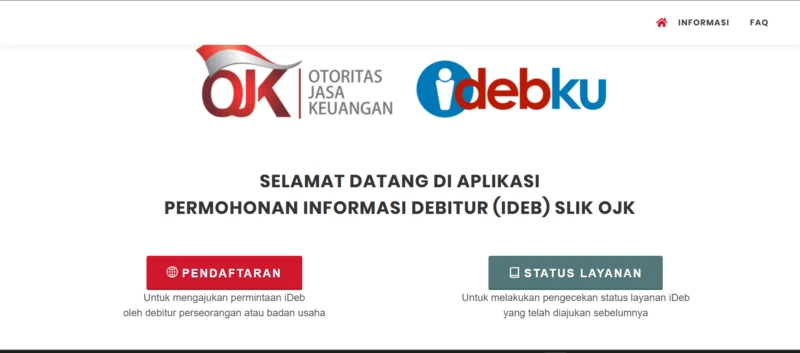
To simplify the process for the public, the Financial Services Authority (OJK) launched the iDebKu portal, allowing users to perform checks directly from a smartphone or laptop without leaving home. Below are the steps:
- Open a web browser on your device and go to the official website idebku.ojk.go.id.
- On the main page, click the Registration button.
- Fill in all required fields on the service availability check page (e.g., Debtor Type, Citizenship, Identity Type, and NIK), then click the Next button.
- Complete the registration form with your full and accurate personal data, then click Next.
- Prepare the required documents (original KTP for Indonesian citizens) and upload a photo of the document to the system.
- You will be asked to upload a selfie photo holding your KTP, following the frame guidelines displayed in the app.
- If the registration is successful, you will receive a confirmation email from OJK containing your registration number.
- Track the status of your request in the Service Status menu on the homepage by entering your registration number.
- OJK will process your iDeb request and send your credit history report as a PDF file via email within a maximum of 1 working day.
2. Checking BI Data Offline at an OJK Office
If you encounter connectivity problems or difficulty uploading documents online, visiting the nearest OJK office is the best option. You must bring different required documents depending on the type of debtor:
Requirements for Individual Debtors:
- Bring the original e‑KTP and a photocopy.
- Fill out the debtor information request form (available at the OJK office or downloadable from the website).
Requirements for Deceased Debtors:
- Provide a copy of the Death Certificate from an authorized agency.
- Provide a photocopy of the valid heir’s KTP.
- Submit a statement or attestation from the legal heir.
- Complete the debtor information request form.
Requirements for Corporate Debtors:
- Provide the company’s Tax Identification Number (NPWP).
- Provide the company’s Articles of Association.
- Provide the latest amendment to the company’s charter (if any).
- Complete the debtor information request form.
Once all documents have been verified by the OJK officer, the iDeb record printing process takes approximately 5 minutes, or 15 minutes if you require a detailed explanation from the officer.
How to Interpret BI Checking Score Results
Once you receive your SLIK OJK document, you will see a table with a series of collectibility scores. According to Financial Services Authority Regulation No. 40/POJK.03/2019, here is what each score means:
- Collectibility 1 (Lancar) – This is the perfect score. The debtor always complies with paying principal and interest installments on time without any record of even a one‑day delay. Your credit will definitely be approved.
- Collectibility 2 (Dalam Perhatian Khusus/DPK) – A yellow‑light status. Given to debtors who have defaulted or experienced installment payment delays of 1 to 90 days.
- Collectibility 3 (Kurang Lancar) – This status begins to make banks doubtful, applicable to debtors who delay or default on payments for 91 to 120 days.
- Collectibility 4 (Diragukan) – It is very difficult to obtain a new loan if you are at this stage, i.e., defaulting on payments for 121 to 180 days.
- Collectibility 5 (Macet) – Blacklist category. Given to debtors who exceed the default limit for more than 180 days. The bank will definitely reject all your new credit applications.
Frequently Asked Questions
Is there a fee for checking BI Checking or SLIK OJK services?
No. All SLIK OJK checking services (iDebKu), whether done online or offline, are free of charge.
How can I remove my name from the blacklist or Collectibility 5 status?
The only way is to settle all outstanding debts along with any recorded penalties at the bank or financing institution. Once paid in full, request a Settlement Certificate and bring it to the relevant bank or OJK to have your blacklist data updated.
How long does it take for the BI Checking score to become clean again after the debt is settled?
After you settle the arrears, the bank needs time to report the updated data to the central OJK system. Typically, your iDeb score will become clean and change to Collectibility 1 the following month (maximum 30 to 60 working days).
It’s crucial and helpful, right? By applying the BI checking methods above, you can assess your financial health early on and take necessary corrective actions before a bank rejects your application.
Want to stay updated on digital bureaucracy services, financial app guides, and other reliable tech news? Don’t forget to follow the latest educational articles only on TheCuy Tekno!


Thanks for visiting thecuy. 🙂
