
Jadi seorang pekerja lepas atau ojol tapi ingin punya jaminan hari tua? Yuk, simak langkah-langkah mendaftar BPJS Ketenagakerjaan untuk pekerja mandiri/BPU berikut ini!
Bekerja sebagai pekerja informal atau Bukan Penerima Upah (BPU) seperti driver ojek online (ojol), pedagang asongan, freelancer, pekerja seni, hingga petani sering dianggap tidak memiliki perlindungan sosial.
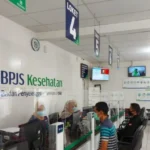
Padahal, layanan kesehatan dan jaminan hari tua dari pemerintah merupakan hak setiap pekerja tanpa terkecuali. Oleh karena itu, memahami cara mendaftar BPJS Ketenagakerjaan menjadi langkah penting untuk memastikan keselamatan kerja Anda dari risiko yang tidak terduga.
Tingkat partisipasi pekerja mandiri dalam program jaminan sosial saat ini masih sangat rendah. Sebagai contoh, dari total 1,8 juta pekerja informal yang beroperasi di wilayah DKI Jakarta saja, baru sekitar 600.000 orang yang telah terdaftar secara resmi.
Padahal, proses pendaftaran BPJS Ketenagakerjaan di era digital saat ini sudah dirancang agar sangat mudah. Kamu tidak perlu melampirkan dokumen dari perusahaan, cukup sediakan persyaratan dasar berupa Nomor Induk Kependudukan (NIK) e-KTP dan alamat email yang masih aktif. Lalu, bagaimana langkah-langkahnya secara detail? Yuk, simak panduan lengkapnya di bawah ini!
Langkah-langkah Mendaftar BPJS Ketenagakerjaan
1. Cara Mendaftar BPJS Ketenagakerjaan Secara Online
Bagi kamu yang memiliki jadwal padat, mobilitas tinggi, dan ingin menghindari antrean, melakukan pendaftaran BPJS Ketenagakerjaan secara online melalui smartphone atau laptop adalah solusi paling cerdas. Berikut adalah langkah-langkahnya:
- Open the browser application on your device, then visit the official registration website at www.bpjsketenagakerjaan.go.id.
- On the homepage, locate and click the ‘Pendaftaran Peserta’ button.
- The screen will display several categories. Choose the ‘Bukan Penerima Upah (BPU)’ category.
- The system will ask you to enter an active email address and retype the captcha code for security verification. Click the REGISTER button.
- Check your email inbox promptly. Look for a message from BPJS and click the ‘Activate Registration’ link within it.
- You will be redirected back to the form page. Fill in the BPU worker’s personal data completely and carefully according to the information on your KTP.
- After the form is submitted, the system will process the data and generate a payment fee code (Virtual Account code) which will be sent via email.
- Make the first payment. Once completed, the physical membership card will be sent to your home address or can be downloaded digitally within 7 days after successful payment confirmation.
2. Cara Daftar BPJS Ketenagakerjaan Secara Offline
If you experience internet connectivity issues, difficulty accessing the web portal, or have specific questions you want to ask the officer, you can still apply for BPJS Employment registration through the conventional method.
- Visit the nearest BPJS Employment Branch Office to your residence and bring your original ID card (KTP).
- Inform the security officer of your purpose, then collect a queue number for the Registration Service.
- Complete the BPU membership registration form provided by the officer thoroughly, accurately, and responsibly.
- Wait in the waiting area until your queue number is called to the Customer Service (CS) desk.
- Submit the form. The CS officer will verify your data and provide a calculation of the initial contribution amount to be paid.
- You will receive a receipt of the registration documents along with a payment code.
- Make the payment at the payment counter, a minimarket, or via the nearest ATM.
- After presenting the successful payment proof, the officer will immediately print and hand over the Membership Certificate and your Participant Card on the same day.
Detail Biaya Bulanan untuk Pekerja Informal (BPU)
Many think that employment insurance costs hundreds of thousands of rupiah. In fact, after successfully registering for BPJS Employment, you will realize that the contribution for informal workers is very cheap and does not burden your daily finances at all.
To become an active participant, you only need to pay a basic contribution of Rp36,800 per month. The allocation details are as follows:
- Rp16,800: Allocated for Work Accident Insurance (JKK) and Death Insurance (JKM).
- Rp20,000: Allocated specifically as a retirement savings fund (JHT) that you can withdraw later.
In order to facilitate payments so that there are no arrears that result in card suspension, informal workers do not need to deposit cash every month. You can register your bank account to use an automatic autodebet system.
Frequently Asked Questions
Apakah pekerja BPU bisa mengikuti program Jaminan Pensiun (JP) seperti karyawan perusahaan?
Tidak. Saat ini, program Jaminan Pensiun (JP) dan Jaminan Kehilangan Pekerjaan (JKP) hanya diperuntukkan bagi pekerja Penerima Upah (PU) atau karyawan formal. Pekerja BPU difokuskan pada JKK, JKM, dan tabungan JHT.
Apakah mendaftar BPJS Ketenagakerjaan bisa dilakukan melalui aplikasi JMO?
Ya, selain melalui portal website, pendaftaran BPJS Ketenagakerjaan untuk jalur BPU kini sudah terintegrasi sepenuhnya di dalam aplikasi resmi Jamsostek Mobile (JMO) yang bisa diunduh di Google Play Store dan App Store.
Berapa lama JHT bisa dicairkan bagi peserta BPU setelah berhenti bekerja?
Dana Jaminan Hari Tua (JHT) bagi peserta BPU dapat dicairkan kapan saja jika peserta telah mencapai usia 56 tahun, mengalami cacat total tetap, meninggal dunia, atau memutuskan untuk berhenti dari seluruh kegiatan ekonomi secara permanen (dengan masa tunggu 1 bulan).
Sangat singkat dan tidak memakan banyak waktu, bukan? Dengan menyisihkan uang senilai dua mangkuk bakso setiap bulan dan mengikuti panduan pendaftaran BPJS Ketenagakerjaan di atas, kamu telah memberikan perlindungan terbaik bagi kesejahteraan kamu dan keluarga di masa depan.
Want to keep your knowledge updated on digital bureaucracy guidelines, public service information, and various other trusted tech news? Come on, don’t forget to always check for the latest educational articles only at TheCuy Tekno!
Stay Connected with TheCuy — Everywhere
Get the latest updates wherever you browse.
Show all 2 authors


Save
Terima kasih sudah mengunjungi thecuy. 🙂

Penulis Berpengalaman 5 tahun.