
Sering beraktivitas di luar? Hati-hati, debu yang menumpuk di ponsel bisa membuat kamera kabur dan merusak porta pengisian daya.
The adverse impacts of dust buildup in smartphones are commonly ignored by people who spend a lot of time outdoors.

Even though the particles are tiny and seem insignificant, over time the buildup of dirt in the crevices of the device can lead to serious damage to internal components.
For those who often carry their gadgets in dusty or highly polluted environments, the risks extend beyond cosmetic damage such as minor scratches.

These microscopic particles can gradually block airflow, reduce camera image quality, and completely disrupt the charging process. Let’s examine the five primary dangers of micro dirt on mobile devices and how to prevent them!
Risks of Accumulated Dust in Smartphones
1. Blocking Internal Air Circulation
The extremely fine dust particles can be drawn into micro-ventilation gaps and adhere to cooling system or vapor chamber surfaces.
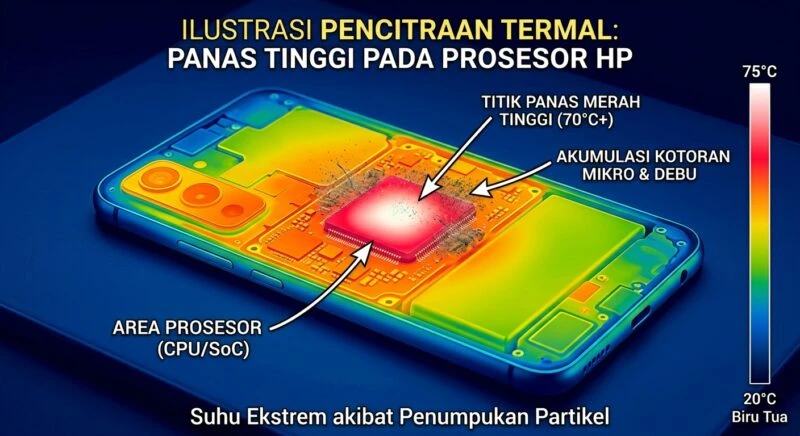
When this accumulation obstructs heat dissipation pathways, the high temperatures generated inside components become trapped. As a result, heat release is impeded, causing the device to feel extremely hot to the touch, and progressively reducing the lifespan of internal electronic components.
2. Primary Cause of Overheating and Performance Decline
According to research from ThePhoneLab, the buildup of microscopic dirt on the surface of the chipset (SoC) and battery module is the main cause of overheating issues.
- Chipset and battery are two components that naturally generate high heat during intensive operation.
- A thick layer of dust acts as an insulating blanket that traps heat inside.
- Consequently, the system automatically engages thermal throttling, resulting in slower device performance (lagging) and accelerated battery health deterioration.
3. Damaging Camera Lens and Sensor Systems
Is your phone’s photo output suddenly showing dark spots or difficulty focusing? Samsung’s technical education page confirms that microscopic dust can infiltrate the camera lens module through tiny gaps in the device casing.
Negative effects of dirt on photography include:
- Permanent dark spots appearing on the image sensor.
- The camera becomes blurry, reducing photo sharpness.
- Facial recognition sensor response slows down due to obstruction by dirt.
- Abrasion from rough particles can scratch the protective glass layer of the lens.
4. Blocking Speaker and USB Charging Port
The speaker grille and USB Type-C charging port are the most exposed external areas, making them highly susceptible to dirt accumulation.
According to Replace Base, compacted dust in the speaker cavity dampens membrane vibrations, resulting in thin, quiet, or distorted sound output. Meanwhile, dust in the USB port obstructs the charging connector pins, causing loose charging cables and rendering the phone unable to charge at all.
5. Causing Permanent Scratches on Screen and Body
Accumulated dust in phones can also cause fine scratches (micro-scratches) on the main screen, aluminum frame, and back body, not only from severe physical impacts. Larger dust particles trapped between the protective case and the phone body will constantly rub against each other when the device is held.
FAQ
Q: What is a safe method to remove dust clogging the USB port of a smartphone?
A: You can use a soft-bristled cleaning brush or an air duster tool. Avoid inserting a sharp metal needle into the port opening, as it can damage the internal connector pins.
Q: Does a smartphone with IP68 certification completely eliminate the risk of dust infiltration?
A: The IP68 feature offers high protection against dust ingress, but over time, as the body’s adhesive seals wear out, the risk of particle intrusion can still occur.
Q: How frequently should the inner part of the case be cleaned?
A: It is recommended to remove and clean the case and the device’s back body at least once a week to eliminate trapped fine sand particles.
In conclusion, understanding the dangers of dust accumulation in smartphones is crucial for keeping your beloved device durable, fast-performing, and retaining high resale value.
Interested in gadget care tips, hardware repair guides, and daily tech trivia? Don’t forget to keep checking our latest articles on TheCuy Tekno so you won’t miss the next exciting discussions!
And you, when was the last time you cleaned your phone’s charger port and case? Share in the comments below!
Terima kasih telah mengunjungi TheCuy. 🙂

Penulis Berpengalaman 5 tahun.