
Want to close your digital wallet account? Let’s see the guide on how to permanently delete your DANA account on Android and iPhone below!
Understanding how to officially and permanently delete a DANA account is crucial for users who want to deactivate their digital wallet service securely.
Whether it’s to change phone number, limit digital transaction usage, or due to data privacy concerns, the account closure process must follow the legal procedures in place on the platform.
Note that simply uninstalling the DANA app from your phone does not automatically close your account. Your phone number, identity data, and account status will remain stored in the DANA system until you officially submit a closure request.
So, how do you delete a DANA account on Android or iPhone devices along with the essential requirements? Come on, check out the complete tutorial below!
Requirements Before Deleting a DANA Account
Before processing a request to permanently delete a DANA account, make sure you have fulfilled all the following DANA account closure requirements so that the request is not rejected:
- Withdraw or use up your balance in DANA, DANA Goals, DANA Bisnis, and any assets in DANA eMAS.
- Clear all outstanding debts on loan services such as DANA PayLater or DANA Cicil.
- Make sure there are no pending transaction statuses, ongoing refunds, or payment disputes in the Activity menu.
- Cancel your participation as a member or manager of the Family Account feature.
- A registered email and phone number are needed to receive OTP codes and identity verification from the support team.
Ways to Delete a DANA Account
Here are the options for procedures on how to delete a DANA account on Android and iPhone, along with official alternative methods:
1. Delete a DANA Account on Android
For Android users, the account closure request can be accessed through the Data Security menu in the app store.
- Open the Google Play Store app and search for the DANA application.
- Scroll down until you find the Data Safety (Data Security) option.
- Tap the Data Deletion menu then select Go to developer site.
- You will be automatically redirected to the Delete Account page within the DANA application.
- READ the terms and conditions that appear, then press Continue / Lanjutkan.
- Complete the security verification (PIN/OTP) until the report is successfully submitted.
2. Delete a DANA Account on iPhone
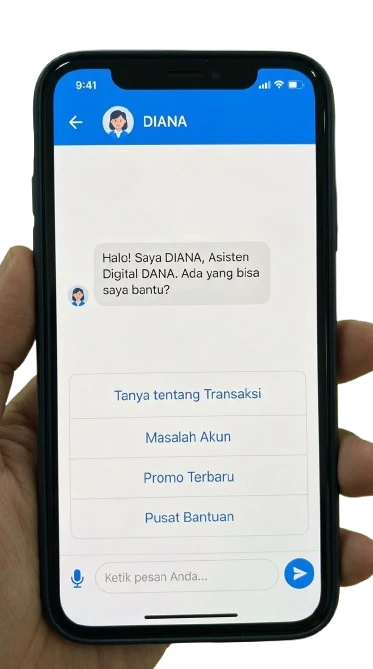
Because the direct account deletion feature is not yet available on iOS, iPhone users can submit a request through the DIANA virtual assistant.
- Open the DANA app on iPhone, then go to the Saya tab.
- Tap the DIANA (Help Center Assistant) option.
- Select the help option related to Account and Profile, then submit your account closure request.
- Follow the identity verification instructions requested by the DIANA system.
3. Submit a Request via Official Email
If you experience access issues with the app, your request can be sent directly to DANA Customer Care:
- Send an email to [email protected] with the subject: Request for DANA Account Deletion.
- Write down your identity details: Full Name, Registered Phone Number, Email, and Reason for Account Closure.
- Wait for an official reply from the DANA team for further verification instructions.
What If the DANA Phone Number Is Already Inactive?
Many users think the account must be deleted if the phone number is lost or inactive. However, if the goal is just to change to a new number, you do not need to delete the account.
Use the Change Mobile Number feature in the Saya > Security Settings menu. If you can no longer log in, select the “Switch to new number” option on the app’s initial page and follow the recovery verification via DIANA.
Penting: A phone number from an account that has been permanently deleted officially cannot be registered again for DANA services in the future.
FAQ
How long does the DANA account deletion process take to be approved?
DANA does not set a specific time estimate (such as 3 or 7 working days). The duration of the process depends on the completeness of data verification and settlement of all user balance/debt obligations.
Why does my DANA account deletion request always fail?
The main causes of failure include remaining balance, unpaid DANA PayLater bills, the account still being connected to a Family Account, or mismatched verification data.
Can transaction history in the DANA app be deleted?
No. Transaction history is permanently stored in the system in accordance with financial regulations and cannot be manually deleted by the user.
It’s clear and easy to understand, right? By applying the methods to delete a DANA account above and fulfilling all the requirements, the process of closing your digital wallet account can proceed safely and smoothly.
Want to know tips on digital transactions, guides for fintech apps, and other trusted technology tutorials? Come on, don’t forget to always update your knowledge only at TheCuy Tekno!
Follow TheCuy — everywhere
Stay updated wherever you scroll.


