Aug 28, 2026
/

By Faradilla A.
/
13 minutes Read

                </div>
            </div>

                            <p class="wp-block-paragraph"><strong>Database</strong> is a structured system designed to store, organise, and manage data, making it simple to retrieve, update, and utilise. It can accommodate a wide variety of information—from user accounts and product inventories to orders and website content—while preserving data accuracy and consistency as the platform scales.</p>
                            <p class="wp-block-paragraph">A database is administered through a <strong>database management system</strong> (<strong>DBMS</strong>), a software layer that stores and retrieves data on demand, controls access permissions, and safeguards information security.</p>
                            <p class="wp-block-paragraph">Since different systems handle varying data types, databases come in many forms. Some are built for structured information—like user and order tables—while others are better suited for flexible or massive datasets, such as logs, messages, and real‑time activity streams.</p>
Apa itu database?
A database is an electronic collection of information organised systematically to enable rapid access and straightforward updates and management. Its purpose is to keep data consistent and easy to locate across the entire system.
A database stores data in structured or semi‑structured formats—such as JSON—to prevent it from being scattered across multiple locations. JSON allows flexible, hierarchical organisation, enabling multiple users or applications to read and write data concurrently without conflicts. For instance, several shoppers can browse products, add items to carts, and complete purchases simultaneously without interfering with each other.
To grasp how it works, the following components constitute a database system:
- Data – the information kept in the system, for example customer details, product catalogs, or transaction records.
- Database management system (DBMS) – software that stores, organises, and controls access to the stored data.
- Storage infrastructure – the physical location where data resides, such as on‑premise servers or cloud platforms.
- Applications – software that interacts with the database, like websites or mobile apps.
Apa kegunaan database?
A database is valuable for managing data in a structured way, as plain files or spreadsheets become unwieldy when data volumes increase. Search and update operations slow down, become error‑prone, and are difficult to scale as system requirements grow.
Mengelola data dalam jumlah besar
A simple list can grow to contain thousands or even millions of entries. At that scale, searching, updating, and organising data slows down, becomes error‑prone, and small changes can take considerable time, while overall performance degrades as file size increases.
Menjaga konsistensi data
A database upholds data accuracy by enforcing rules defined by developers.
Without such constraints, data can become scattered, chaotic, and inconsistent. Imagine a spreadsheet storing customer details where one entry reads “USA”, another “United States”, and a third leaves the field blank.
As the dataset grows, these discrepancies make filtering, grouping, and analysis far more difficult.
Duplicate entries present a similar issue. The same customer might appear twice with slightly varied information, leading to errors in reporting or communication.
A database can avert these problems by imposing clear rules. For instance, it may require each customer to provide a valid email address, enforce correct field entries, and reject duplicate records. Such constraints keep the dataset tidy, consistent, and accurate, even as it grows.
Mendukung banyak pengguna
A database allows numerous users and applications to access and modify data at the same time without causing conflicts. This capability is vital for systems handling concurrent activities. Without a database, simultaneous edits by different parties could overwrite each other or create inconsistencies.
Consider an e‑commerce site where multiple shoppers browse products, add items to carts, and complete purchases simultaneously, while inventory levels are updated in the background. The database synchronises all these changes to preserve data integrity.
Menjalankan kueri yang kompleks
A database enables structured queries that efficiently locate, filter, and analyse large volumes of data. By contrast, using plain files or spreadsheets makes complex information retrieval both difficult and time‑consuming. Databases are specifically engineered to process such requests swiftly.
For example, queries can be used to:
- Identify all available products priced below a certain threshold.
- Retrieve all transactions recorded within the last 30 days.
- Monitor seat availability across multiple flights.
- Load a user’s profile, posts, and connections instantly.
Komponen utama sistem database
A database system is comprised of four core components: the data itself, the DBMS, the schema, and the queries.
Data
Data represents the information stored within the database.
Sistem manajemen database (DBMS)
A DBMS is software that governs how data is stored, accessed, and administered.
It serves as an intermediary layer between the data and the applications that use it, sparing the applications from dealing directly with raw data.
Core functions of a DBMS include:
- Store and organise data
- Process queries or data requests
- Enforce rules to maintain data consistency
- Manage user access and security
- Handle backup and recovery operations
For instance, when you log into a website and view your account details, the application sends a request to the DBMS, which retrieves the relevant data and returns it securely.
Popular DBMS options include MySQL and PostgreSQL for relational databases, and MongoDB for non‑relational (document‑oriented) databases.
Skema
Schema defines how data is structured within the database and what types of data are permitted.
Put simply, a schema consists of rules that answer these questions:
- What data should be stored?
- What format should each piece of data follow?
- How are different pieces of data related to one another?
For example, when designing a basic e‑commerce site, a schema might define a customers table with columns such as name and email.
The orders table could include fields like order ID, customer ID, and total price.
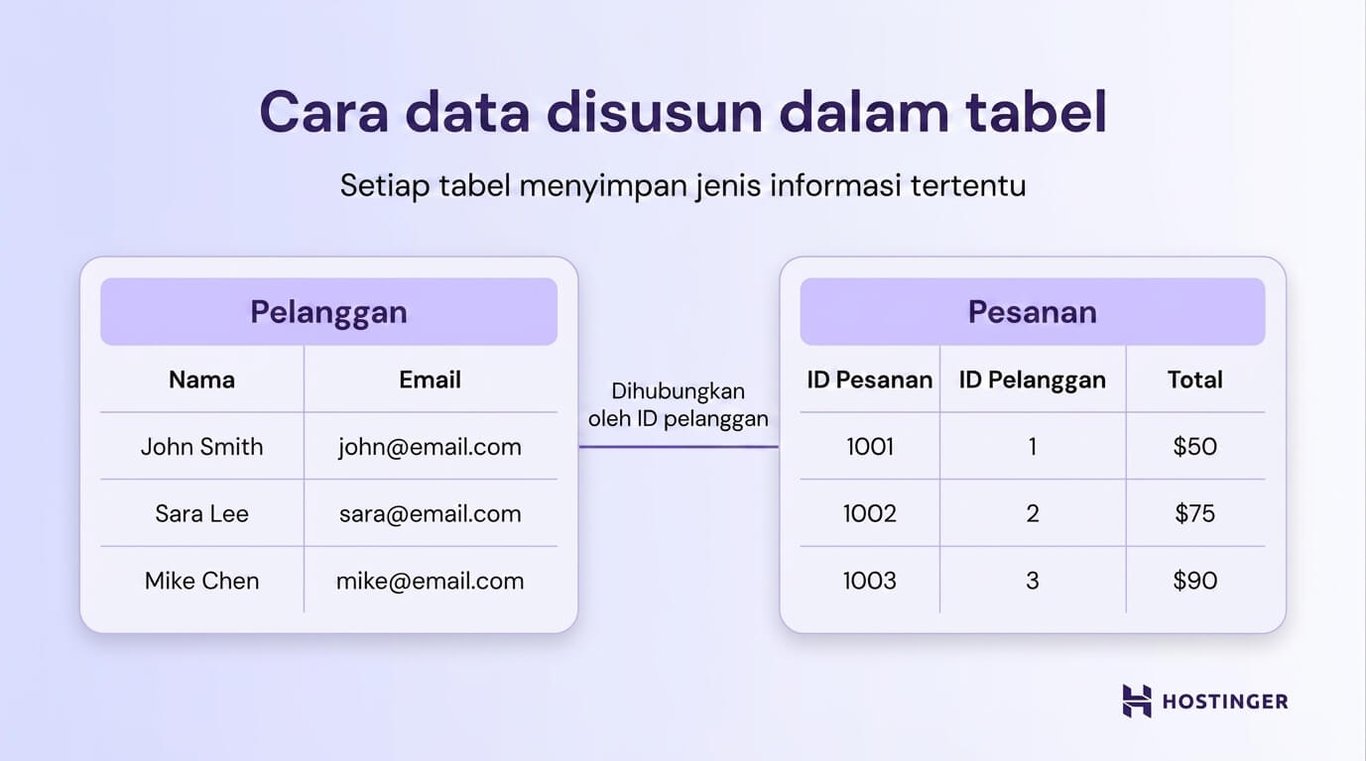
A schema also establishes relationships between data items.
For instance, each order must be linked to an existing customer, preventing the creation of orders with invalid customer IDs.
Absent a schema, a system could end up storing orders without associated customers, accepting incorrectly formatted email addresses, or mixing unrelated data. With a schema in place, the database knows what data is allowed, where it belongs, and how the various pieces relate to each other.
Tabel, baris, dan kolom
Data in a database is organised into tables.
- Table holds a collection of related data items, such as customer records.
- Row represents a single data entry, like an individual customer.
- Column denotes a specific attribute, for example name or email address.
A simple example follows:
| Customer ID | Name | |
|---|---|---|
| 1 | John Smith | [email protected] |
| 2 | Sara Lee | [email protected] |
Query refers to a command used to interact with a database—such as retrieving, updating, or deleting data. Most databases employ SQL (Structured Query Language) to execute these commands.
For example, queries can be used to:
- Retrieve all customer records.
- Find orders placed within the last 30 days.
- Update product prices.
- Delete inactive user accounts.
In practice, applications use queries as a means to “talk” to a database.
When you search for a product on a website, for instance, the application sends a query to locate matching items. The database processes this request and returns the results for display.
The same principle applies when you update your profile or place an order. Each action triggers a query that reads from or writes to the database behind the scenes.
Bagaimana cara kerja database?
1. Menambahkan dan menyimpan data
Data can enter a database via user actions, system processes, or direct input. Typically, there are three pathways for this to occur:
- Applications – users input data while interacting with a website or app.
- APIs – systems exchange data automatically.
- Administrative tools – developers or administrators add or modify data directly.
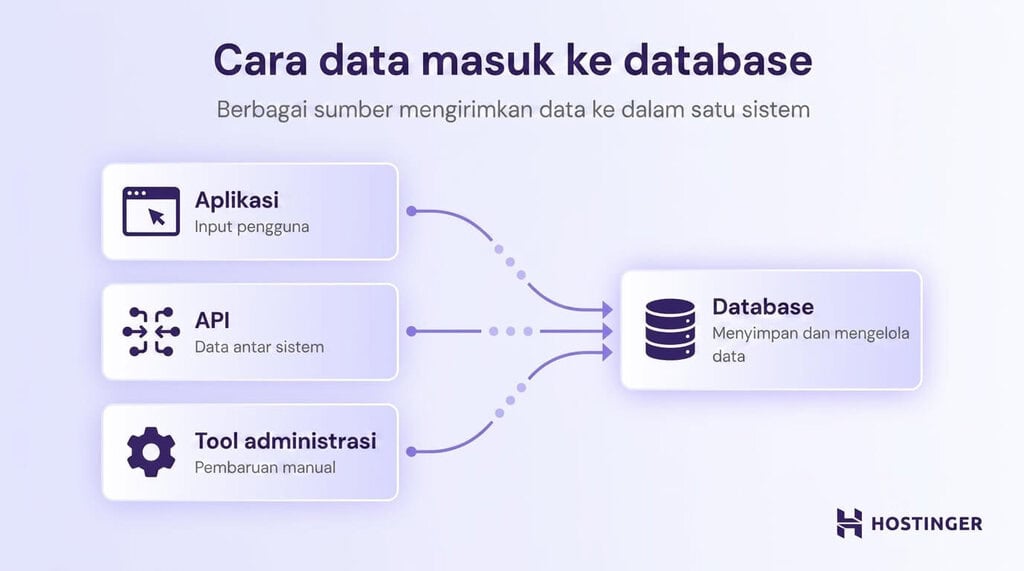
For example, when you create an account, complete a form, or place an order, the information is transmitted from the application to the database.
Upon receipt, the data is validated and organised according to the rules defined in the schema. Typical constraints include:
- The email column must contain a valid email address
- Price fields must be numeric
- Orders must be linked to an existing customer
If the data does not meet these rules, the database can reject it, preventing incorrect or incomplete information from being stored. This validation ensures that even with thousands or millions of records being added, the data remains consistently structured and accurate.
2. Mencari dan mengambil data
When an application requires information, it sends a query to the database, which processes the request, locates matching data, and returns the results.
For instance, when you search for a product on an e‑commerce site, the application might send a request like “Find products matching this name or keyword.” The database processes the query and returns results for display on the page.
Most databases use SQL to handle such requests, operating largely behind the scenes from the user’s perspective. Nonetheless, an application might issue SQL commands to retrieve specific information, for example:
- All customers
- Orders placed within the last 30 days
- Products priced below a certain threshold
Queries almost invariably include filtering to ensure that only data meeting specific conditions is returned, rather than the entire dataset.
Examples of filtered queries include:
- Orders created this week
- Products that are currently in stock
- Users located in a particular country
Filtering keeps the displayed results relevant while minimising the volume of unnecessary data.
As a database grows, searching can slow down if every record must be examined one by one. To speed things up, databases employ indexes.
An index functions like the index in a book: instead of scanning every page, you can jump straight to the section you need. Databases can also use indexes to locate specific records—such as a user’s email address—rapidly, without scanning the entire dataset.
3. Memperbarui atau menghapus data
A database allows stored records to be modified or removed to keep information accurate.
Over time, stored data naturally changes: users may update account details, products may run out of stock, and orders may be completed or cancelled. The database must handle these modifications without compromising its structure or causing inconsistencies.
Three fundamental operations manage such changes: insert, update, and delete.
Insert adds new data to the database. For instance, when a new customer registers or a fresh product is added to an e‑commerce site, the system creates and stores a new record.
Update alters existing data. If a user changes their email address or a product’s price is adjusted, the database modifies the relevant record without generating a duplicate.
Delete removes data that is no longer needed, such as inactive accounts or products that have been withdrawn from the catalog.
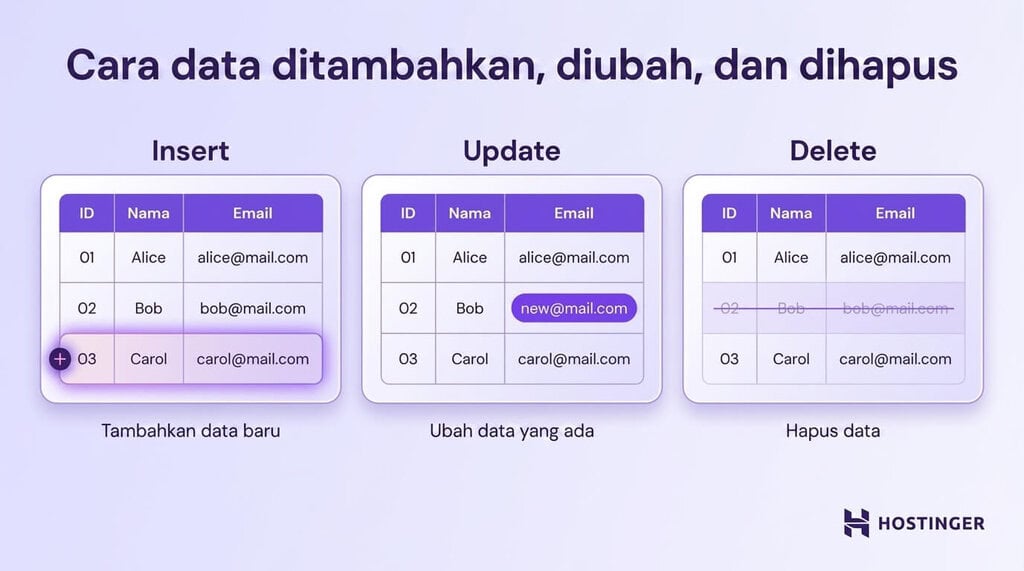
What sets a database apart from simple file storage is its ability to enforce these changes while maintaining data integrity.
In other words, the database guarantees that modifications do not corrupt relationships between data items or produce invalid records.
For example, an order cannot be reassigned to a non‑existent customer, and a product tied to an active order may be prevented from deletion, depending on the defined constraints. The database applies these rules automatically, ensuring that data remains consistent and accurate as it is added, updated, or removed.
4. Menjaga konsistensi data saat terjadi perubahan
A database can bundle related actions into a single transaction, ensuring that either all steps succeed or the entire operation rolls back.
Many real‑world operations involve a series of interdependent changes.
Consider a money transfer between two bank accounts:
- Debit the amount from Account A
- Credit the amount to Account B
If the first step succeeded but the second failed, funds could be lost. Therefore, the two changes must not be processed independently.
A transaction resolves this by treating both actions as a single unit. Either all steps complete successfully, or the entire operation is rolled back, restoring the database to its prior state. This mechanism safeguards data accuracy and prevents partially completed updates.
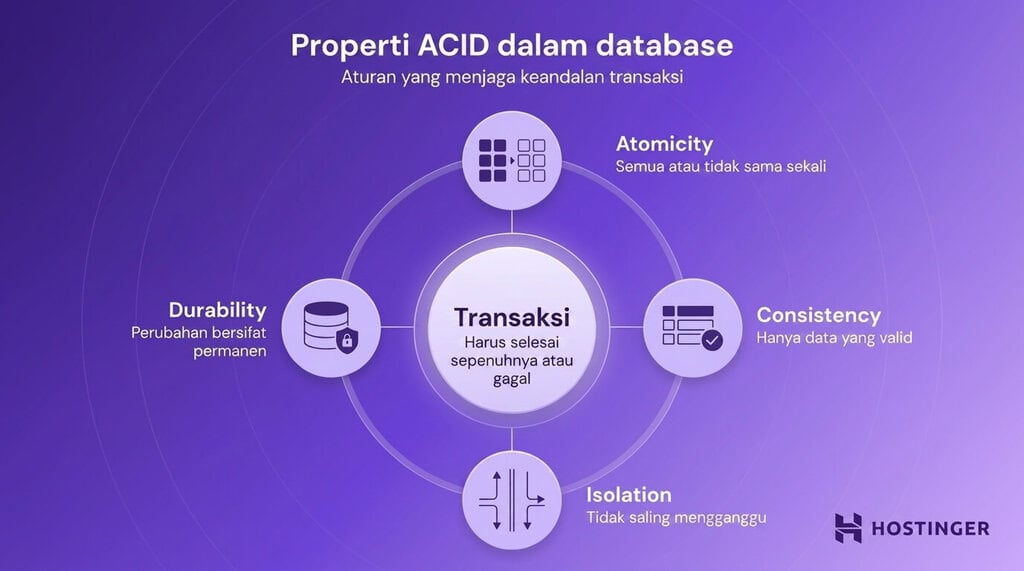
Databases use a set of principles called ACID to ensure transactions are processed correctly and data remains consistent:
- Atomicity – All steps in a transaction must succeed; if any step fails, the whole transaction is rolled back.
- Consistency – Data must stay valid and adhere to rules before and after a transaction.
- Isolation – Multiple transactions can run concurrently without interfering.
- Durability – Once a transaction completes, its changes are permanent, even if the system fails.
For example, placing an order in an online store may involve several concurrent steps:
- The order record is created
- Payment is processed
- Inventory levels are updated
These steps can be wrapped in a single transaction. If any one step fails, the entire process is rolled back to avoid inconsistencies such as a charge being applied without a corresponding order record.
5. Melindungi dan memulihkan data
A database offers mechanisms for backing up data and restoring it when problems arise.
No system is immune to failures: servers can break down, software can crash, and data can be accidentally erased. To mitigate these risks, databases provide methods for preserving copies of data and recovering them as needed.
A backup is a snapshot of data taken at a specific moment. For instance, a database might generate daily backups that encompass all customer, order, and product information.
If an accidental deletion or data corruption occurs, a backup can be used to revert the database to its previous state, preventing permanent loss.
Replication involves storing identical copies of data across multiple locations. Rather than keeping everything on a single server, a database can continuously duplicate data to additional servers.
Beyond protection, replication can boost performance. Some systems route read‑only requests to replicas, reducing the load on the primary database.
Failure recovery refers to the process of restoring a database to a healthy state after an outage. This may include:
- Restoring data from a backup
- Switching to a replica if the primary server fails
- Re‑applying recent changes to bring the database up to date
Jenis-jenis database dan contohnya
The most common database categories include:
- Relational (SQL) databases – store information in structured tables with well‑defined relationships.
- NoSQL databases – accommodate flexible or unstructured data using formats such as documents, key‑value pairs, or graphs.
- Cloud databases – hosted on cloud infrastructure and accessed over the internet.
- Distributed databases – keep data across multiple physical systems to handle larger volumes of data and traffic while preserving availability in the event of a failure.
Database relasional (SQL)
Relational databases organise data into structured tables and link records based on specific relationships.
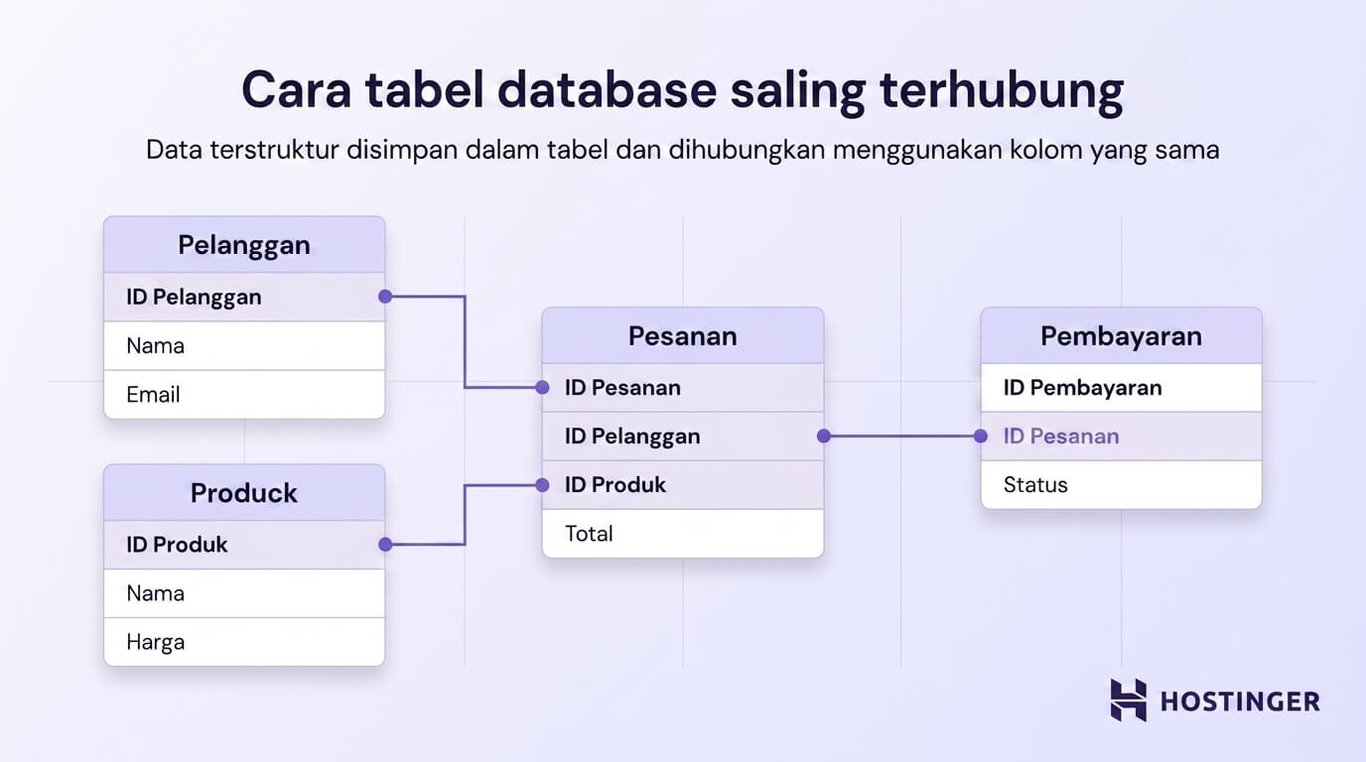
Information is split across multiple tables, each representing a distinct entity—such as customers or orders. These tables can be related to one another to maintain data consistency.
For example, an e‑commerce database might include a customers table storing names and email addresses, and an orders table holding order IDs, dates, and customer IDs. The two tables are connected through a shared value like the customer ID, allowing the system to determine which orders belong to each customer.
Relational databases employ a rigid schema, meaning that the data format is defined in advance. Each record conforms to this structure, keeping the dataset orderly and predictable.
They typically rely on SQL for data manipulation, enabling users or applications to retrieve specific records, filter and sort information, and update or delete data as needed.
A key strength is strong consistency. The database guarantees that data adheres to predefined rules and remains accurate, even when numerous users or systems interact with it simultaneously.
| Kelebihan | Kekurangan |
|---|---|
| A clear structure simplifies organisation and understanding of the data | Inflexible when data structures need frequent changes |
| Ensures data consistency and accuracy | More challenging to scale for very large or distributed systems |
| Supports complex queries using SQL | Requires a predefined schema before data can be stored |
| Suitable for data with complex relationships, such as users and orders | Less suitable for highly unstructured or rapidly changing data |
Database NoSQL
NoSQL databases are built to store data with a flexible or unstructured format, meaning the schema does not have to be defined upfront.
This adaptability makes them a good fit when data structures frequently change, data volumes grow rapidly, or the information cannot be comfortably represented in tabular form.
NoSQL systems are not limited to a single storage model. Instead, they offer several models that can be chosen based on the specific characteristics of the data and the requirements of the application.
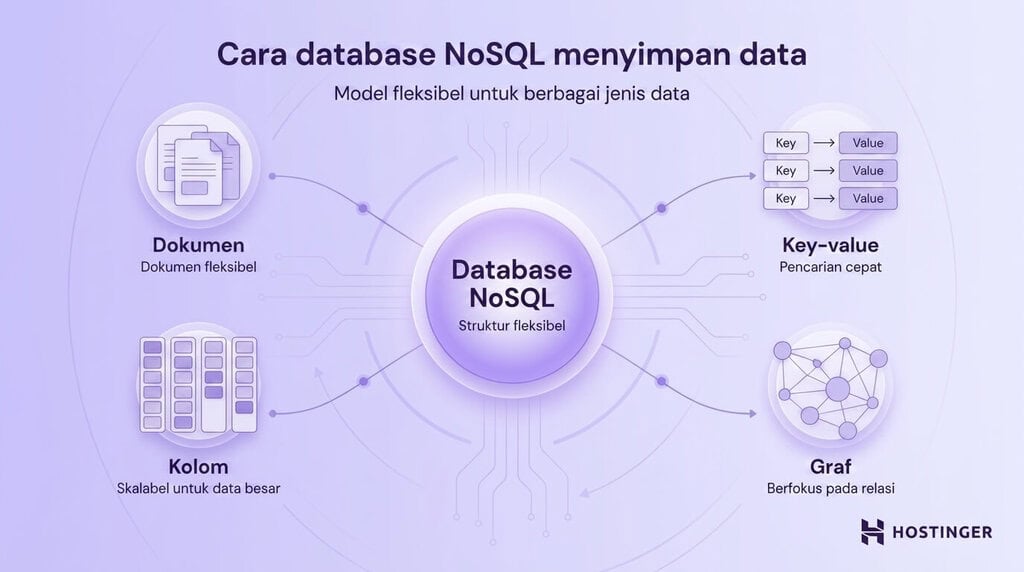
Document databases
These databases store information as flexible documents, commonly using JSON format.
Each entry can have a distinct structure. For instance, one product might include colour and size attributes, while another could feature entirely different fields.
Such flexibility makes document databases ideal for e‑commerce catalogs and content‑management systems.
Key‑value databases
These databases keep data as simple pairs of a key and a corresponding value.
Think of it like a dictionary:
- key → user123
- value → user data
This model offers very fast access and is often employed for caching or session storage, such as maintaining a user’s login state.
Column‑family databases
These databases organise data by columns rather than by rows, which makes them efficient for handling large data volumes and performing analytical queries.
They are commonly used in big‑data processing and analytical systems.
Graph databases
These databases centre on data relationships, representing information with nodes and edges instead of traditional tables.
They excel in scenarios heavily dependent on interconnections, such as social networks, recommendation engines, and fraud detection.
| Kelebihan | Kekurangan |
|---|---|
| Provides flexible structures without demanding a rigid schema | Less standardised compared to SQL databases |
| Capable of handling large data volumes and rapid growth | Data consistency can be harder to maintain |
| Suitable for unstructured data or data with frequently changing formats | Query capabilities can vary and lack consistency across systems |
| High performance for specific use cases such as caching and real‑time applications | Requires careful selection of a model that matches the requirements |
Database cloud
A cloud database is hosted on cloud infrastructure rather than on‑premise servers.
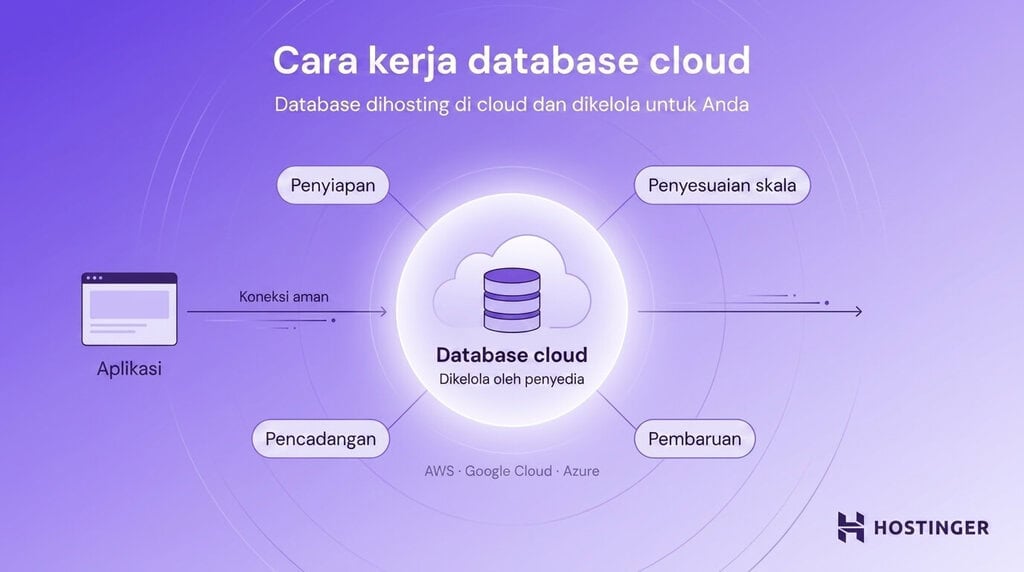
With a cloud database, you are relieved of the responsibility for provisioning hardware, installing database software, or handling routine maintenance; the cloud provider manages these tasks, and you can access the database over the internet.
The process of storing and retrieving data follows the same principles as other database types. The main difference is that the provider handles many operational duties behind the scenes, including:
- Initial setup and configuration
- Updates and maintenance
- Scaling resources as data grows
- Backup and recovery
| Kelebihan | Kekurangan |
|---|---|
| Eliminates the need to manage servers or underlying infrastructure | Leads to ongoing costs that scale with usage |
| Allows easy scaling of capacity as the application grows | Provides limited control over the underlying hardware |
| Offers built‑in capabilities for backup, updates, and security | Reliant on internet connectivity or inter‑system links |
| Helps maintain database availability during outages | May create vendor lock‑in, making migration to another provider more difficult |
Database terdistribusi
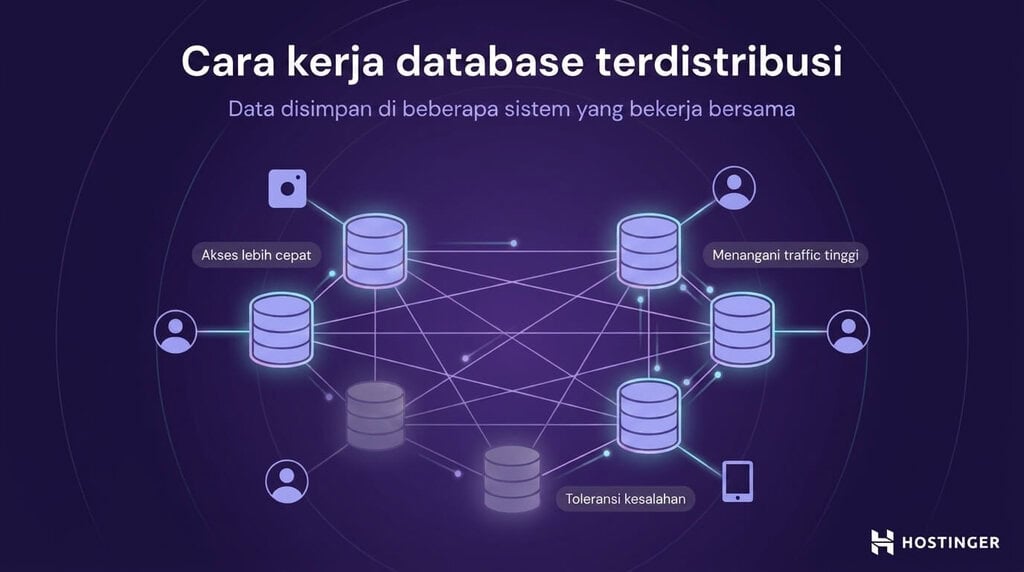
A distributed database keeps data across multiple physical systems instead of consolidating everything on a single server.
Data may be spread across machines located in the same data centre or across different geographic regions. Despite this dispersion, the systems operate as a unified database.
The primary goals of this architecture are to increase system capacity and to ensure service continuity if one server fails.
Consider a global e‑commerce platform with users in many countries. Rather than routing every request to a central server, a distributed database can store data closer to each user, providing faster access, balancing higher traffic loads, and maintaining operation even if one server goes down.
| Kelebihan | Kekurangan |
|---|---|
| Capable of handling very large data volumes and traffic | More complex to design and manage |
| High availability, as the system can continue operating if a single node fails | More difficult to maintain strong consistency across all nodes |
| Faster access for global users, with data stored closer to their location | Debugging and troubleshooting processes are more complex |
| System capacity can be scaled by adding more machines | Requires careful planning of data distribution |
Database vs. spreadsheet vs. penyimpanan file
Databases are designed for large‑scale systems with many users, especially when data must stay orderly, consistent, and easy to locate. By contrast, spreadsheets and plain file storage are better suited for smaller, simpler, or less structured needs.
The comparison below highlights the main differences:
| Fitur | Database | Spreadsheet | Penyimpanan file |
|---|---|---|---|
| Volume data | Can contain very large amounts, from millions to billions of records | Limited, as performance degrades as data grows | Varies by storage capacity, but data remains unstructured |
| Akses multi-pengguna | Supports many concurrent users | Limited and may lead to conflicts | Basic; files can be shared but are not managed as a system |
| Kemampuan kueri | Advanced, featuring search, filtering, and cross‑table data joining | Basic, such as sorting and filtering | Unavailable; search must be performed manually |
| Struktur | Defined schema with relational data links | Simple tables of rows and columns | Unstructured, such as documents, images, and other files |
Bagaimana database digunakan dalam aplikasi?
Databases are employed in virtually every application that needs to store and manage information.
When you interact with a website or app, a database typically operates behind the scenes, holding data, updating it as changes occur, and retrieving it when needed.
Typical use cases include:
- E‑commerce sites use databases to manage products, customers, orders, and payments.
- Banking systems store account balances, transaction records, and customer information.
- Social‑media platforms keep user profiles, posts, likes, and connections between users.
- Reservation systems, such as those for airlines or hotels, handle availability, bookings, and schedules.

A common example is the WordPress database.
WordPress relies on a database to hold site content and settings, encompassing posts, pages, user accounts, comments, and configuration details.
When you view a blog post, WordPress fetches the content from the database and displays it on the page. Conversely, when you publish a new post or edit a page, the information is written back to the database.
Across many applications, databases perform the same core functions: storing data, retrieving it quickly, and maintaining accuracy even when numerous users access the system at once.
In short, a database forms a critical foundation for modern applications, enabling data to be stored securely and consistently while remaining accessible in real time.
All tutorial content on this website has been thoroughly reviewed in accordance with
                Hostinger’s editorial standards and commitments.
        </strong>
    </p>

            <img src="https://www.thecuy.com/wp-content/uploads/2026/08/apa-itu-basis-data-pemahaman-komponen-dan-jenis-jenisnya.webp" alt="Add as Google Prefered Source" width="139" height="auto" class="m-0 p-0"/>

    </div>
</div>
<div class="description mt-15 mt-30-md" readability="14.686684073107">
    <p class="text-center text-sm-start">
        Faradilla, who is commonly known as Ninda, has a decade of experience as a linguist and five years as a Content Marketing Specialist at Hostinger. She is passionate about emerging technologies, digital marketing, and language learning. Through Hostinger’s tutorials, Ninda aims to share knowledge and assist readers in solving the challenges they encounter. Get to know Ninda better on LinkedIn.        </p>
</div>

</div>
Explore more tutorials on Seputar Tutorial Page.
Thank you for visiting thecuy. 🙂
I hope the rephrased content preserves all HTML tags and structure while providing fresh wording and readability.

Saya adalah jurnalis di thecuy.com yang fokus menghadirkan berita terkini, analisis mendalam, dan informasi terpercaya seputar perkembangan dunia finansial, bisnis, teknologi, dan isu-isu terkini yang relevan bagi pembaca Indonesia.
Sebagai jurnalis, saya berkomitmen untuk:
Menyajikan berita yang akurasi dan faktanya terverifikasi.
Menulis dengan bahasa yang mudah dipahami, namun tetap menjaga integritas jurnalistik.
Menghadirkan laporan mendalam yang memberi perspektif baru bagi pembaca.
Di thecuy.com, saya tidak hanya melaporkan berita, tetapi juga berupaya menganalisis tren agar pembaca dapat memahami konteks di balik setiap peristiwa.
📌 Bidang Liputan Utama:
Berita Terbaru & ekonomi, keuangan.
Perkembangan teknologi dan inovasi digital.
Tren bisnis dan investasi.
Misi saya adalah membantu pembaca mendapatkan informasi yang cepat, akurat, dan dapat dipercaya, sehingga mereka bisa membuat keputusan yang lebih cerdas dalam kehidupan sehari-hari maupun dunia usaha.
📞 Kontak
Untuk kerja sama media atau wawancara, silakan hubungi melalui halaman Kontak thecuy.com atau email langsung ke [email protected].