🌍 Translate this article:
❌ Batalkan Translate (Kembali ke Teks Asli) Pilih Bahasa Terjemahan... Afrikaans Albanian Amharic Arabic Armenian Azerbaijani Basque Belarusian Bengali Bosnian Bulgarian Catalan Cebuano Chichewa Chinese (Simplified) Chinese (Traditional) Corsican Croatian Czech Danish Dutch English Esperanto Estonian Filipino Finnish French Frisian Galician Georgian German Greek Gujarati Haitian Creole Hausa Hawaiian Hebrew Hindi Hmong Hungarian Icelandic Igbo Indonesian Irish Italian Japanese Javanese Kannada Kazakh Khmer Kinyarwanda Korean Kurdish (Kurmanji) Kyrgyz Lao Latin Latvian Lithuanian Luxembourgish Macedonian Malagasy Malay Malayalam Maltese Maori Marathi Mongolian Myanmar (Burmese) Nepali Norwegian Odia (Oriya) Pashto Persian Polish Portuguese Punjabi Romanian Russian Samoan Scots Gaelic Serbian Sesotho Shona Sindhi Sinhala Slovak Slovenian Somali Spanish Sundanese Swahili Swedish Tajik Tamil Tatar Telugu Thai Turkish Turkmen Ukrainian Urdu Uyghur Uzbek Vietnamese Welsh Xhosa Yiddish Yoruba Zulu
War Fantasy is a psychological horror FPS crafted by Nathan Tran, a former Call of Duty developer. After nine years of solo development, the game introduces a unique concept that diverges from typical war shooters.
War Fantasy blends war video game elements with depictions of real conflict to explore the links between entertainment, violence, and the military industry.
An Overview of War Fantasy
VIDEO
Video courtesy: GameTrailers / YouTube
In this game, you do not take on the role of a war hero. Instead, you are placed in a never‑ending loop of a military training facility.
Every action, shot, and player decision is recorded and analysed by a system designed to shape a soldier without question. The commander’s voice continuously gives instructions while monitoring the player’s progress.
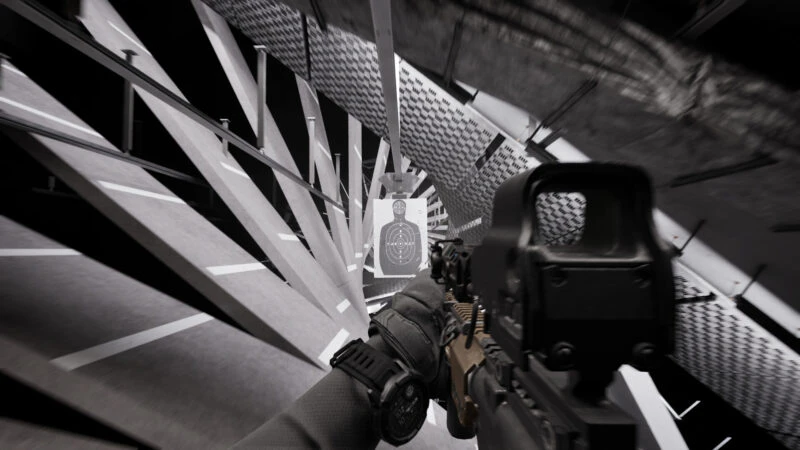
War Fantasy’s world is crafted with surreal and disorienting environments. Hallways can spin endlessly, training simulations feel like they have no exit, and military industrial facilities stretch illogically. These elements gradually make players question the line between simulation and reality.
Key Features of War Fantasy
Image provided by Steam
Branching Dark Narrative . The story can change and loop repeatedly based on player behaviour.Surreal World . Explore environments that can change, collapse, and rearrange themselves.Modern Armour . Use firearms, drones, and futuristic technology with realistic detail.Surveillance System . Every player action is recorded and can be used by the system to affect the journey.System Mystery . Uncover the structure behind the facility that traps the main character and find a way out.
Through an anti‑war perspective and strong psychological themes, War Fantasy provides a more reflective FPS experience than plain action. The game is scheduled to launch on PS5, Xbox Series X|S, and PC.
Also Read:
Follow TheCuy — everywhere
Stay updated wherever you scroll.
Tim Editorial
</section>
Suka Suka Love Haha Wow Sedih
		<p>
							<button type="button" class="minami-reactions__btn minami-reactions__btn--like" role="menuitemradio" data-wp-on--click="actions.reactLike" data-wp-bind--aria-checked="state.isLike" data-wp-bind--disabled="state.reactionBusy" aria-label="Suka">
							<span class="minami-reactions__tip" aria-hidden="true">Suka</span>
							<span class="minami-reactions__icon" aria-hidden="true"><svg class="minami-icon minami-reactions__glyph" data-icon="thumbs-up" viewBox="0 0 24 24" width="24" height="24" aria-hidden="true" focusable="false" role="img"><use href="#mi-thumbs-up"></use></svg></span>
			<span class="minami-reactions__count" hidden data-wp-bind--hidden="!state.hasLikeCount" data-wp-text="state.likeCount"></span>
		</button>
							<button type="button" class="minami-reactions__btn minami-reactions__btn--love" role="menuitemradio" data-wp-on--click="actions.reactLove" data-wp-bind--aria-checked="state.isLove" data-wp-bind--disabled="state.reactionBusy" aria-label="Love">
							<span class="minami-reactions__tip" aria-hidden="true">Love</span>
							<span class="minami-reactions__icon" aria-hidden="true"><svg class="minami-icon minami-reactions__glyph" data-icon="heart" viewBox="0 0 24 24" width="24" height="24" aria-hidden="true" focusable="false" role="img"><use href="#mi-heart"></use></svg></span>
			<span class="minami-reactions__count" hidden data-wp-bind--hidden="!state.hasLoveCount" data-wp-text="state.loveCount"></span>
		</button>
							<button type="button" class="minami-reactions__btn minami-reactions__btn--laugh" role="menuitemradio" data-wp-on--click="actions.reactLaugh" data-wp-bind--aria-checked="state.isLaugh" data-wp-bind--disabled="state.reactionBusy" aria-label="Haha">
							<span class="minami-reactions__tip" aria-hidden="true">Haha</span>
							<span class="minami-reactions__icon" aria-hidden="true"><svg class="minami-icon minami-reactions__glyph" data-icon="meme" viewBox="0 0 24 24" width="24" height="24" aria-hidden="true" focusable="false" role="img"><use href="#mi-meme"></use></svg></span>
			<span class="minami-reactions__count" hidden data-wp-bind--hidden="!state.hasLaughCount" data-wp-text="state.laughCount"></span>
		</button>
							<button type="button" class="minami-reactions__btn minami-reactions__btn--wow" role="menuitemradio" data-wp-on--click="actions.reactWow" data-wp-bind--aria-checked="state.isWow" data-wp-bind--disabled="state.reactionBusy" aria-label="Wow">
							<span class="minami-reactions__tip" aria-hidden="true">Wow</span>
							<span class="minami-reactions__icon" aria-hidden="true"><svg class="minami-icon minami-reactions__glyph" data-icon="wow" viewBox="0 0 24 24" width="24" height="24" aria-hidden="true" focusable="false" role="img"><use href="#mi-wow"></use></svg></span>
			<span class="minami-reactions__count" hidden data-wp-bind--hidden="!state.hasWowCount" data-wp-text="state.wowCount"></span>
		</button>
							<button type="button" class="minami-reactions__btn minami-reactions__btn--sad" role="menuitemradio" data-wp-on--click="actions.reactSad" data-wp-bind--aria-checked="state.isSad" data-wp-bind--disabled="state.reactionBusy" aria-label="Sedih">
							<span class="minami-reactions__tip" aria-hidden="true">Sedih</span>
							<span class="minami-reactions__icon" aria-hidden="true"><svg class="minami-icon minami-reactions__glyph" data-icon="sad" viewBox="0 0 24 24" width="24" height="24" aria-hidden="true" focusable="false" role="img"><use href="#mi-sad"></use></svg></span>
			<span class="minami-reactions__count" hidden data-wp-bind--hidden="!state.hasSadCount" data-wp-text="state.sadCount"></span>
		</button>
		</p>
Simpan
Share <dialog class="minami-share__sheet" aria-label="Share post ini" data-wp-watch="callbacks.syncShareSheet" data-wp-on--close="actions.onShareClose">
<p>
<h2 class="minami-share__sheet-title">Share</h2>
<button type="button" class="minami-share__sheet-close" aria-label="Tutup" data-wp-on--click="actions.closeShare">×</button>
</p>
<button type="button" class="minami-share__opt minami-share__opt--native" hidden data-wp-bind--hidden="!context.canShare" data-wp-on--click="actions.nativeShare">
<span class="minami-share__opt-icon" aria-hidden="true">
<svg width="20" height="20" viewBox="0 0 24 24" fill="none" stroke="currentColor" stroke-width="2" aria-hidden="true"><circle cx="18" cy="5" r="3"></circle><circle cx="6" cy="12" r="3"></circle><circle cx="18" cy="19" r="3"></circle><path d="m8.6 13.5 6.8 4M15.4 6.5l-6.8 4"></path></svg>
</span>
<span class="minami-share__opt-label">Share lewat…</span>
</button>
</dialog>
Explore other games at Latest Game Info thecuy . 🙂
Terkait