
Can’t remember your own number when you need an OTP? Let’s check out the latest guide on how to verify your Indosat IM3 number using dial codes, SMS, and the following app!
Forgetting the digits of your own phone number is a common issue that happens all the time. Especially if the card is used primarily for internet data, as a backup number to receive OTPs, or installed on a device that’s rarely used for voice calls.
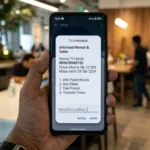
Knowing how to check your Indosat number becomes urgent when you suddenly need to verify an account, log in to a marketplace, or activate a store cash register app.
The good news is, Indosat Ooredoo Hutchison (IM3) offers many options to verify your card’s identity. From instant methods that don’t need internet data, using apps, to checking via population data.

So, which method suits your current situation best? Let’s pick one of the 19 guides on how to check your Indosat number below!
19 Ways to Check Your Indosat Number

How to Check Indosat Number Without Internet
If you need a quick solution and have no internet connection, try these USSD code methods:
- Dial *888#
- Dial *123#
- Shortcut *123*30#
- Dial *885#
Ways to Verify Your Number via Device & Others’ Assistance
Don’t want to type codes? Just use your phone’s features and the numbers of people around you:
- Send SMS to a Friend
- Missed Call (Call Another Number)
- Check WhatsApp Profile
- phone’s Default Settings
- Contact ‘My Number’
- Check the SIM Card Packaging
Ways to Check Your Number Online
For those who have data quota or are connected to WiFi, this method is much more convenient visually:
- Download the MyIM3 app. If your number has been linked before, it will appear large on the homepage.
- Open the official Indosat number verification portal. Enter your ID card NIK and Family Card number. The system will display the number registered under that name.
- If that Indosat number was set as an email recovery option, check in Google Account > Personal Info > Phone Number (Recovery).
- If it was linked to social media, open Instagram > Settings > Account Center > Personal Info > Contact Information.
How to Verify Your Number Through Customer Service
This method is ideal if your card has technical issues or you need direct validation from the operator:
- Call 185 and follow the voice instructions to ask a staff member to check your number (a data verification process is required).
- Chat the official Indosat/IM3 WA virtual assistant, type “Check Number”, and follow the bot‘s instructions.
- Send a Direct Message (DM) to the official @indosatcare account. Avoid posting personal data in public comment sections.
- Send an email regarding complaints or number verification requests to the official customer service email address of Indosat.
- Final option if the card is dead, deactivated, or fails to receive OTP. Visit an official outlet, bringing your original ID card and the physical SIM card.
How to Verify If Your Indosat Number is Active or Not
Before using it to receive important OTPs, make sure your card is active based on the following indicators:
- Has Signal
- The operator’s signal bar appears and remains stable in the top corner of the phone screen.
- Can Make Calls/SMS
- If calls consistently fail completely, the card may be in a dead grace period.
- Responds to Dial Codes
- If typing
*888#still brings up an interactive menu, the operator’s system is still reading your number.
- If typing
- Receives SMS OTP
- Try logging in to MyIM3; if an SMS OTP arrives, your card is 100% active.
- Test Recharging
- If recharging always gets rejected with the message “number not registered”, the card is likely permanently deactivated.
Additional Information About Indosat Numbers
- How to Check Number Age
- Dial
*888#or open the MyIM3 app and go to the “Profile” or “Card Info” menu to see the approximate activation time.
- Dial
- How to Check Indosat Credit
- The fastest way without internet is to press
*888#. If you have internet, just refresh the MyIM3 app’s homepage.
- The fastest way without internet is to press
- How to Check Registered ID Number
- For identity security, type SMS
INFO#NIKand send it to 4444. The operator will reply with details of the number linked to your ID card.
- For identity security, type SMS
There are many solutions to overcome a small panic, aren’t there? An always-active number is key to maintaining smooth daily digital transactions.
By practicing the above Indosat number checking methods, you can immediately obtain your contact digits precisely according to the access you currently have.
Want to keep updating your knowledge with mobile operator troubleshooting tricks, recommendations for the most efficient internet packages, and other reliable technology guides? Come on, stay tuned for the latest article updates only on TheCuy Tekno!
Follow TheCuy — everywhere
Stay updated wherever you scroll.
Show all 2 authors


terimakasih sudah mengunjungi thecuy. 🙂

Penulis Berpengalaman 5 tahun.