🌍 Translate this article:
❌ Batalkan Translate (Kembali ke Teks Asli) Pilih Bahasa Terjemahan... Afrikaans Albanian Amharic Arabic Armenian Azerbaijani Basque Belarusian Bengali Bosnian Bulgarian Catalan Cebuano Chichewa Chinese (Simplified) Chinese (Traditional) Corsican Croatian Czech Danish Dutch English Esperanto Estonian Filipino Finnish French Frisian Galician Georgian German Greek Gujarati Haitian Creole Hausa Hawaiian Hebrew Hindi Hmong Hungarian Icelandic Igbo Indonesian Irish Italian Japanese Javanese Kannada Kazakh Khmer Kinyarwanda Korean Kurdish (Kurmanji) Kyrgyz Lao Latin Latvian Lithuanian Luxembourgish Macedonian Malagasy Malay Malayalam Maltese Maori Marathi Mongolian Myanmar (Burmese) Nepali Norwegian Odia (Oriya) Pashto Persian Polish Portuguese Punjabi Romanian Russian Samoan Scots Gaelic Serbian Sesotho Shona Sindhi Sinhala Slovak Slovenian Somali Spanish Sundanese Swahili Swedish Tajik Tamil Tatar Telugu Thai Turkish Turkmen Ukrainian Urdu Uyghur Uzbek Vietnamese Welsh Xhosa Yiddish Yoruba Zulu
As the launch and the State of Play event on August 18 approach, S-Game has finally revealed the PC specifications for Phantom Blade Zero. This information includes the minimum hardware requirements and recommendations to help players achieve better performance while playing.
S-Game created Phantom Blade Zero as an action-RPG featuring a kungfupunk or wuxiapunk theme. The game blends classic Chinese martial arts (Wuxia) with a dark atmosphere, futuristic tech, and assorted mechanical and robotic elements.
System Specs for Phantom Blade Zero
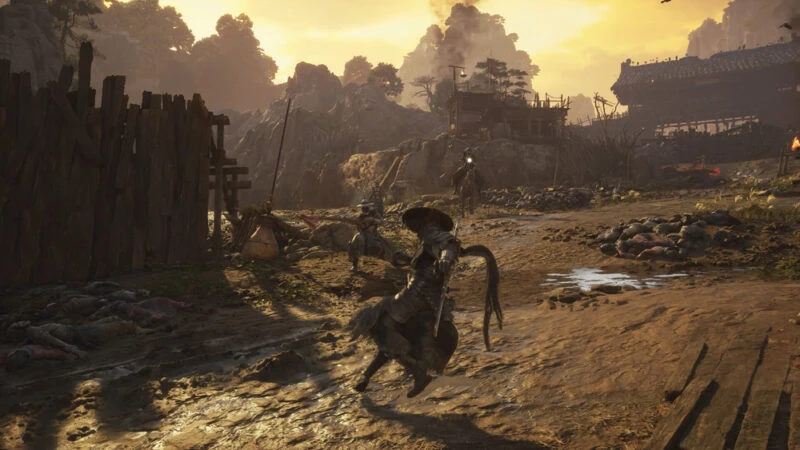
Image: S-Game At the lowest settings, Phantom Blade Zero requires an Intel Core i7-8700K or AMD Ryzen 5 3600 processor, 16 GB of RAM, and a NVIDIA GeForce GTX 1660 6 GB or AMD Radeon RX 5500 XT 8 GB graphics card.
The game also requires DirectX 12 and an SSD. With that configuration, players can aim for a 1080p resolution at 30 FPS thanks to upscaling technology.
Minimum System Requirements for Phantom Blade Zero
Resolusi: 1080p at 30 FPS with upscalingProsesor: Intel Core i7-8700K or AMD Ryzen 5 3600RAM: 16 GBGPU: NVIDIA GeForce GTX 1660 6 GB or AMD Radeon RX 5500 XT 8 GBDirectX: Versi 12Penyimpanan: SSD
Recommended System Specs for Phantom Blade Zero
Resolusi: 1440p at 60 FPS with upscalingProsesor: Intel Core i5-10600K or AMD Ryzen 5 5600XRAM: 16 GBGPU: NVIDIA GeForce RTX 3060 Ti 8 GB or AMD Radeon RX 6700 XT 12 GBDirectX: Versi 12Storage: SSD
S-Game also provided ray-tracing details. To run the game at 1080p and 60 FPS with ray tracing, players need an RTX 5060 8 GB. Meanwhile, path tracing at 2160p and 60 FPS requires an RTX 5080 16 GB.
These are the PC specifications for Phantom Blade Zero that need to be prepared before its release on October 28, 2026.
Follow TheCuy — everywhere
Stay updated wherever you scroll.
Tim Editorial
</section>
Suka Suka Love Haha Wow Sedih
		<p>
							<button type="button" class="minami-reactions__btn minami-reactions__btn--like" role="menuitemradio" data-wp-on--click="actions.reactLike" data-wp-bind--aria-checked="state.isLike" data-wp-bind--disabled="state.reactionBusy" aria-label="Suka">
							<span class="minami-reactions__tip" aria-hidden="true">Suka</span>
							<span class="minami-reactions__icon" aria-hidden="true"><svg class="minami-icon minami-reactions__glyph" data-icon="thumbs-up" viewBox="0 0 24 24" width="24" height="24" aria-hidden="true" focusable="false" role="img"><use href="#mi-thumbs-up"></use></svg></span>
			<span class="minami-reactions__count" hidden data-wp-bind--hidden="!state.hasLikeCount" data-wp-text="state.likeCount"></span>
		</button>
							<button type="button" class="minami-reactions__btn minami-reactions__btn--love" role="menuitemradio" data-wp-on--click="actions.reactLove" data-wp-bind--aria-checked="state.isLove" data-wp-bind--disabled="state.reactionBusy" aria-label="Love">
							<span class="minami-reactions__tip" aria-hidden="true">Love</span>
							<span class="minami-reactions__icon" aria-hidden="true"><svg class="minami-icon minami-reactions__glyph" data-icon="heart" viewBox="0 0 24 24" width="24" height="24" aria-hidden="true" focusable="false" role="img"><use href="#mi-heart"></use></svg></span>
			<span class="minami-reactions__count" hidden data-wp-bind--hidden="!state.hasLoveCount" data-wp-text="state.loveCount"></span>
		</button>
							<button type="button" class="minami-reactions__btn minami-reactions__btn--laugh" role="menuitemradio" data-wp-on--click="actions.reactLaugh" data-wp-bind--aria-checked="state.isLaugh" data-wp-bind--disabled="state.reactionBusy" aria-label="Haha">
							<span class="minami-reactions__tip" aria-hidden="true">Haha</span>
							<span class="minami-reactions__icon" aria-hidden="true"><svg class="minami-icon minami-reactions__glyph" data-icon="meme" viewBox="0 0 24 24" width="24" height="24" aria-hidden="true" focusable="false" role="img"><use href="#mi-meme"></use></svg></span>
			<span class="minami-reactions__count" hidden data-wp-bind--hidden="!state.hasLaughCount" data-wp-text="state.laughCount"></span>
		</button>
							<button type="button" class="minami-reactions__btn minami-reactions__btn--wow" role="menuitemradio" data-wp-on--click="actions.reactWow" data-wp-bind--aria-checked="state.isWow" data-wp-bind--disabled="state.reactionBusy" aria-label="Wow">
							<span class="minami-reactions__tip" aria-hidden="true">Wow</span>
							<span class="minami-reactions__icon" aria-hidden="true"><svg class="minami-icon minami-reactions__glyph" data-icon="wow" viewBox="0 0 24 24" width="24" height="24" aria-hidden="true" focusable="false" role="img"><use href="#mi-wow"></use></svg></span>
			<span class="minami-reactions__count" hidden data-wp-bind--hidden="!state.hasWowCount" data-wp-text="state.wowCount"></span>
		</button>
							<button type="button" class="minami-reactions__btn minami-reactions__btn--sad" role="menuitemradio" data-wp-on--click="actions.reactSad" data-wp-bind--aria-checked="state.isSad" data-wp-bind--disabled="state.reactionBusy" aria-label="Sedih">
							<span class="minami-reactions__tip" aria-hidden="true">Sedih</span>
							<span class="minami-reactions__icon" aria-hidden="true"><svg class="minami-icon minami-reactions__glyph" data-icon="sad" viewBox="0 0 24 24" width="24" height="24" aria-hidden="true" focusable="false" role="img"><use href="#mi-sad"></use></svg></span>
			<span class="minami-reactions__count" hidden data-wp-bind--hidden="!state.hasSadCount" data-wp-text="state.sadCount"></span>
		</button>
		</p>
Simpan
Share <dialog class="minami-share__sheet" aria-label="Share post ini" data-wp-watch="callbacks.syncShareSheet" data-wp-on--close="actions.onShareClose">
<p>
<h2 class="minami-share__sheet-title">Share</h2>
<button type="button" class="minami-share__sheet-close" aria-label="Tutup" data-wp-on--click="actions.closeShare">×</button>
</p>
<button type="button" class="minami-share__opt minami-share__opt--native" hidden data-wp-bind--hidden="!context.canShare" data-wp-on--click="actions.nativeShare">
<span class="minami-share__opt-icon" aria-hidden="true">
<svg width="20" height="20" viewBox="0 0 24 24" fill="none" stroke="currentColor" stroke-width="2" aria-hidden="true"><circle cx="18" cy="5" r="3"></circle><circle cx="6" cy="12" r="3"></circle><circle cx="18" cy="19" r="3"></circle><path d="m8.6 13.5 6.8 4M15.4 6.5l-6.8 4"></path></svg>
</span>
<span class="minami-share__opt-label">Share lewat…</span>
</button>
</dialog>
Baca juga games lainnya di Info game terbaru thecuy . 🙂
Terkait