🌍 Translate this article:
❌ Batalkan Translate (Kembali ke Teks Asli) Pilih Bahasa Terjemahan... Afrikaans Albanian Amharic Arabic Armenian Azerbaijani Basque Belarusian Bengali Bosnian Bulgarian Catalan Cebuano Chichewa Chinese (Simplified) Chinese (Traditional) Corsican Croatian Czech Danish Dutch English Esperanto Estonian Filipino Finnish French Frisian Galician Georgian German Greek Gujarati Haitian Creole Hausa Hawaiian Hebrew Hindi Hmong Hungarian Icelandic Igbo Indonesian Irish Italian Japanese Javanese Kannada Kazakh Khmer Kinyarwanda Korean Kurdish (Kurmanji) Kyrgyz Lao Latin Latvian Lithuanian Luxembourgish Macedonian Malagasy Malay Malayalam Maltese Maori Marathi Mongolian Myanmar (Burmese) Nepali Norwegian Odia (Oriya) Pashto Persian Polish Portuguese Punjabi Romanian Russian Samoan Scots Gaelic Serbian Sesotho Shona Sindhi Sinhala Slovak Slovenian Somali Spanish Sundanese Swahili Swedish Tajik Tamil Tatar Telugu Thai Turkish Turkmen Ukrainian Urdu Uyghur Uzbek Vietnamese Welsh Xhosa Yiddish Yoruba Zulu
Home
Games
Little Kitty, Big City Coming Soon on iOS and Android
Little Kitty, Big City will launch on iOS and Android by the end of 2026, delivering an adorable feline odyssey through a vibrant open‑world filled with surprises.
Little Kitty, Big City is set to arrive on mobile platforms soon. Double Dagger Studio has announced that this open‑world adventure game will be released on iOS via the App Store and on Android by the end of 2026.
Previously, the feline adventure game launched on Xbox Series, Xbox One, Nintendo Switch, and PC on May 9, 2024.
Overview of Little Kitty, Big City
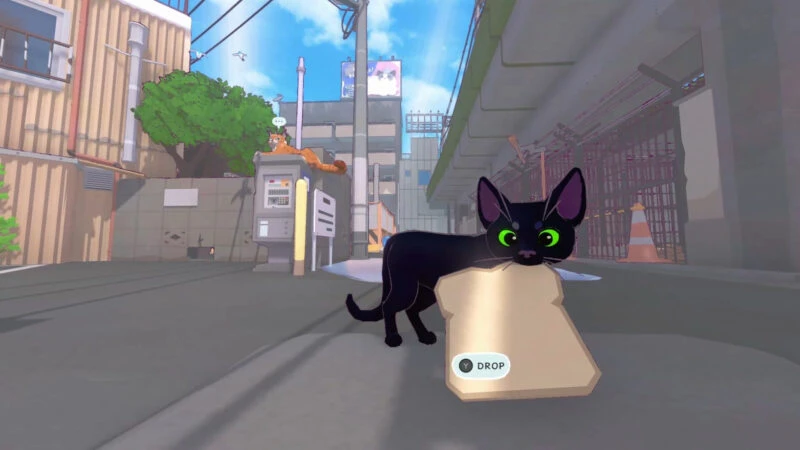
Image credit: Steam In Little Kitty, Big City, players take on the role of a tiny kitten lost in a bustling metropolis. To find its way home, players can freely explore the colorful urban environment, meeting various animals and helping them with their quests.
Yet, being a kitten, players also have the freedom to cause minor mayhem along the way. The gameplay focuses on open‑world exploration. Players can choose their own activities without rushing to finish the main story.
From nap‑times in the sunshine and helping other creatures to swiping strangers’ bagels and knocking over potted plants, all these antics are part of the adventure.
Beyond exploration, players can interact with a cast of quirky animal characters, each with their own distinct personalities. A variety of side quests and requests provide extra activities while navigating the city, and players can dress up their feline avatar with a collection of adorable hats.
With its relaxed vibe, adorable characters, and a surprise‑filled open world, Little Kitty, Big City looks like a great pick for casual mobile gamers.
The iOS and Android versions are slated for release by the end of 2026, meaning mobile players won’t have to wait long to embark on the little cat’s adventure.
Also Read:
Stay Connected with TheCuy Everywhere
Get the latest updates on the go.
Tim Editorial
</section>
Suka Suka Love Haha Wow Sedih
		<p>
							<button type="button" class="minami-reactions__btn minami-reactions__btn--like" role="menuitemradio" data-wp-on--click="actions.reactLike" data-wp-bind--aria-checked="state.isLike" data-wp-bind--disabled="state.reactionBusy" aria-label="Suka">
							<span class="minami-reactions__tip" aria-hidden="true">Suka</span>
							<span class="minami-reactions__icon" aria-hidden="true"><svg class="minami-icon minami-reactions__glyph" data-icon="thumbs-up" viewBox="0 0 24 24" width="24" height="24" aria-hidden="true" focusable="false" role="img"><use href="#mi-thumbs-up"></use></svg></span>
			<span class="minami-reactions__count" hidden data-wp-bind--hidden="!state.hasLikeCount" data-wp-text="state.likeCount"></span>
		</button>
							<button type="button" class="minami-reactions__btn minami-reactions__btn--love" role="menuitemradio" data-wp-on--click="actions.reactLove" data-wp-bind--aria-checked="state.isLove" data-wp-bind--disabled="state.reactionBusy" aria-label="Love">
							<span class="minami-reactions__tip" aria-hidden="true">Love</span>
							<span class="minami-reactions__icon" aria-hidden="true"><svg class="minami-icon minami-reactions__glyph" data-icon="heart" viewBox="0 0 24 24" width="24" height="24" aria-hidden="true" focusable="false" role="img"><use href="#mi-heart"></use></svg></span>
			<span class="minami-reactions__count" hidden data-wp-bind--hidden="!state.hasLoveCount" data-wp-text="state.loveCount"></span>
		</button>
							<button type="button" class="minami-reactions__btn minami-reactions__btn--laugh" role="menuitemradio" data-wp-on--click="actions.reactLaugh" data-wp-bind--aria-checked="state.isLaugh" data-wp-bind--disabled="state.reactionBusy" aria-label="Haha">
							<span class="minami-reactions__tip" aria-hidden="true">Haha</span>
							<span class="minami-reactions__icon" aria-hidden="true"><svg class="minami-icon minami-reactions__glyph" data-icon="meme" viewBox="0 0 24 24" width="24" height="24" aria-hidden="true" focusable="false" role="img"><use href="#mi-meme"></use></svg></span>
			<span class="minami-reactions__count" hidden data-wp-bind--hidden="!state.hasLaughCount" data-wp-text="state.laughCount"></span>
		</button>
							<button type="button" class="minami-reactions__btn minami-reactions__btn--wow" role="menuitemradio" data-wp-on--click="actions.reactWow" data-wp-bind--aria-checked="state.isWow" data-wp-bind--disabled="state.reactionBusy" aria-label="Wow">
							<span class="minami-reactions__tip" aria-hidden="true">Wow</span>
							<span class="minami-reactions__icon" aria-hidden="true"><svg class="minami-icon minami-reactions__glyph" data-icon="wow" viewBox="0 0 24 24" width="24" height="24" aria-hidden="true" focusable="false" role="img"><use href="#mi-wow"></use></svg></span>
			<span class="minami-reactions__count" hidden data-wp-bind--hidden="!state.hasWowCount" data-wp-text="state.wowCount"></span>
		</button>
							<button type="button" class="minami-reactions__btn minami-reactions__btn--sad" role="menuitemradio" data-wp-on--click="actions.reactSad" data-wp-bind--aria-checked="state.isSad" data-wp-bind--disabled="state.reactionBusy" aria-label="Sedih">
							<span class="minami-reactions__tip" aria-hidden="true">Sedih</span>
							<span class="minami-reactions__icon" aria-hidden="true"><svg class="minami-icon minami-reactions__glyph" data-icon="sad" viewBox="0 0 24 24" width="24" height="24" aria-hidden="true" focusable="false" role="img"><use href="#mi-sad"></use></svg></span>
			<span class="minami-reactions__count" hidden data-wp-bind--hidden="!state.hasSadCount" data-wp-text="state.sadCount"></span>
		</button>
		</p>
Simpan
Share <dialog class="minami-share__sheet" aria-label="Share post ini" data-wp-watch="callbacks.syncShareSheet" data-wp-on--close="actions.onShareClose">
<p>
<h2 class="minami-share__sheet-title">Share</h2>
<button type="button" class="minami-share__sheet-close" aria-label="Tutup" data-wp-on--click="actions.closeShare">×</button>
</p>
<button type="button" class="minami-share__opt minami-share__opt--native" hidden data-wp-bind--hidden="!context.canShare" data-wp-on--click="actions.nativeShare">
<span class="minami-share__opt-icon" aria-hidden="true">
<svg width="20" height="20" viewBox="0 0 24 24" fill="none" stroke="currentColor" stroke-width="2" aria-hidden="true"><circle cx="18" cy="5" r="3"></circle><circle cx="6" cy="12" r="3"></circle><circle cx="18" cy="19" r="3"></circle><path d="m8.6 13.5 6.8 4M15.4 6.5l-6.8 4"></path></svg>
</span>
<span class="minami-share__opt-label">Share lewat…</span>
</button>
</dialog>
Check out other games at Latest Game Info thecuy . 🙂
Terkait