
If you often buy games on Steam, the term Steam Wallet is certainly already familiar. Steam Wallet is a balance that can be used to make purchases on Steam, ranging from games to various digital products available on the platform.

One practical way to increase your balance is to buy Steam Wallet online. You don’t need to look for a physical card in a store or go to a specific location. Just select the appropriate amount, make the payment, and then redeem the code to your Steam account.
However, before purchasing, there are several things to consider, especially regarding region, payment methods, and transaction security.

What Is Steam Wallet?
Steam Wallet is a balance that can be used for purchases on Steam. This balance can be used to buy games, DLCs, specific items, and other digital products available on Steam.
To increase your balance, you can use several methods available on Steam, including Steam Wallet Code. The code can be purchased online from digital retailers and then used to add balance to your account.
What you need to pay attention to is the region of your Steam account. Steam Wallet Code has certain regional restrictions, so the code you purchase must match the region of your Steam account.
So, before checking out, don’t just look at the amount. Make sure the product you choose can actually be used for your Steam account.
Easy Steps to Purchase Steam Wallet
Purchasing Steam Wallet online is actually quite simple and doesn’t take much time. Generally, the steps are as follows.
1. Choose a Steam Wallet Code
First, determine the amount of Steam Wallet you want to purchase. Choose the amount based on your needs, for example, to buy a specific game or top up your balance before buying multiple games at once.
At this stage, also pay attention to the region of the Steam Wallet Code. Make sure that after making the payment, the code you purchased is actually suitable for your account’s region.
2. Review Product Details
Before proceeding with the payment, double-check the product details. Ensure that the amount, currency, and region are correct. If you’re buying from a digital retailer, be sure to also read the information provided on the product page to avoid choosing the wrong item.
3. Select Payment Method
After the product is suitable, proceed to checkout and select the available payment method.
Payment options may vary depending on the retailer and your location. Therefore, choosing a retailer that provides familiar payment methods can make the purchasing process feel more convenient.
4. Complete Payment
After selecting the payment method, complete the transaction according to the instructions provided.
For digital transactions, you usually don’t need to wait for physical delivery. After the payment and verification process is complete, the code will be sent digitally according to the retailer’s policy.
5. Redeem Your Steam Wallet Code
After obtaining the code, you can use it to add balance to your Steam account.
Log in to your Steam account, open the section for redeeming Steam Wallet Code, and then enter the code you obtained. After the process is successful, the balance will be added to your account and can be used for purchases on Steam.
Purchase Steam Wallet at OffGamers
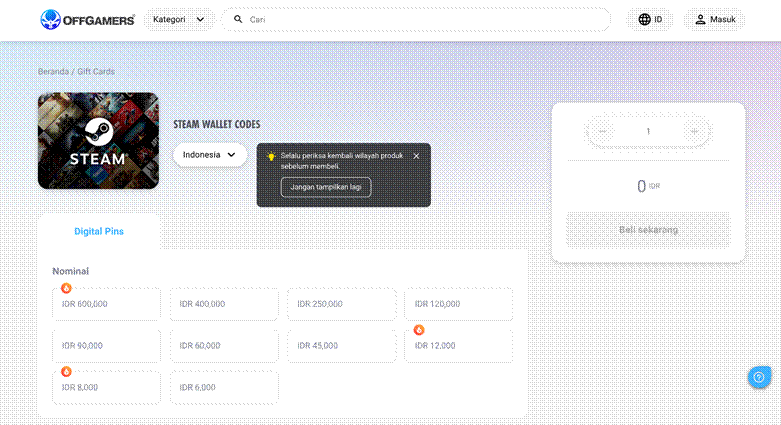
If you’re looking for a practical way to purchase Steam Wallet online, OffGamers could be a viable option to consider.
One advantage is that the entire process is done online. You can choose a Steam Wallet Code, determine the required amount, and then proceed with the payment without having to search for a physical card in a store.
OffGamers also offers several categories of payment methods, allowing you to choose the most convenient option available.
In addition to convenience, security is also important when purchasing digital products. OffGamers uses SSL technology to help encrypt communication during transactions and implements verification processes for certain transactions.
With this process, you can purchase Steam Wallet online without having to provide the code or transaction information to other parties.
How to Redeem Steam Wallet Code
After purchasing a Steam Wallet Code, the next step is to enter the code into your Steam account.
It’s quite simple:
1. Log in to your Steam account.
2. Open the Steam Wallet Code redemption page.
3. Enter the Steam Wallet code you purchased.
4. Follow the on-screen instructions.
5. After successful redemption, the balance will be added to your Steam Wallet.
Once the balance is added, you can use it to purchase games or other digital products available on Steam.
If the code cannot be used, don’t immediately try purchasing another code. First, check whether the region and currency of the code match your Steam account.
Conclusion
Buying Steam Wallet is actually not difficult. You just need to choose the appropriate amount, ensure that the product region matches your Steam account, select a payment method, and then redeem the code after obtaining it.
If you prefer a fully online process, OffGamers could be a practical choice for purchasing a Steam Wallet Code. You can select the product online, use the available payment methods, and receive the product digitally after the transaction is complete.
Most importantly, don’t just focus on the price. Make sure you also pay attention to the region, payment method, transaction process, and retailer security before making a purchase.
FAQ
Q: Can Steam Wallet be used to purchase games?
A: Yes. The Steam Wallet balance can be used to make purchases on Steam, including games and other eligible digital products.
Q: Does Steam Wallet Code have a region?
A: Yes. Some Steam Wallet Codes have regional restrictions. Therefore, always check the region before purchasing and make sure it matches your Steam account.
Q: Is it safe to buy Steam Wallet online?
A: It can be, as long as you purchase from a trusted retailer and pay attention to transaction security. Avoid buying codes from unknown sources and never give the code you purchased to someone else.
Q: How do you use a Steam Wallet Code?
A: After obtaining the code, log in to your Steam account, open the Steam Wallet Code redemption page, and then enter the code according to the instructions provided.
Q: Can you purchase Steam Wallet without a physical card?
A: Yes. Steam Wallet Code is available in digital form, so you can purchase it online without needing to buy a physical card in a store.
Also check out other games at Latest Game Info
Thank you for visiting thecuy 🙂

Owner Thecuy.com