
Watch out, main credit could be drained! Come on, secure your number by applying the fastest and free credit method to check Smartfren quota below.
For cellular internet service users, regularly checking Smartfren’s data allowance is essential. Because, suddenly exhausting a data plan while you’re busy surfing or streaming not only hampers what you’re doing, but also greatly threatens to consume your standard credit because of the non‑package internet base‑rate pricing.

To stop this credit loss, the provider has offered multiple checking options that are simple to reach.
You can tap into a quick USSD code, dispatch a complimentary SMS, or keep an eye on usage in real time via a digital dashboard application.

Which way to check your Smartfren data is best for your current needs? Come on, review the full tutorial below!
4 Methods to Check Smartfren Quota
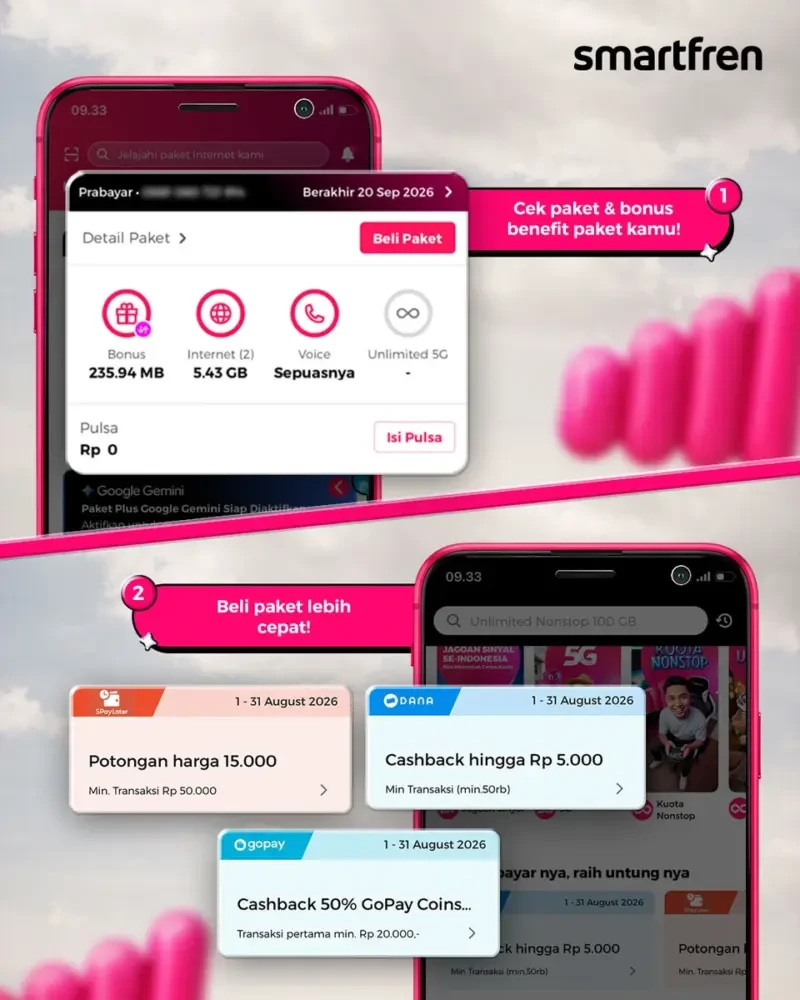
Below are the official procedures to verify your Smartfren data balance that you can perform right from a mobile device or computer:
1. How to Check Smartfren Quota by Dialing *995#
- Launch the Phone or Calls application on your gadget.
- Key in the
*995#Smartfren quota dial code, then hit the Call button. - Give it a few seconds for a pop‑up to appear on the display.
- The system will instantly reveal the current data plan name, the leftover data, and how long it stays active.
2. How to Check Smartfren Quota via MySmartfren App
- Grab the MySmartfren app from the Play Store if you have Android, or the App Store for iOS.
- Sign in with your Smartfren mobile number.
- On the primary screen (Home or Account section), you’ll be able to view the whole SIM status immediately.
- Beyond the leftover main data, the program also showcases how the data is split (like night‑time or local usage) and the balance of your standard credit.
3. Checking Smartfren Quota Through SMS (Free of Charge)
- Launch the Messaging or SMS feature on your handset.
- Enter the word CEK (case doesn’t matter).
- Transmit the message to 995.
- Soon after, the carrier will answer with information about the validity of your Smartfren plan plus the data you still have left. The service costs nothing and won’t subtract from your balance.
4. Checking Smartfren Quota Through the Official Website
- Run a web browser on your computer or laptop.
- Go to the official page my.smartfren.com.
- Sign in using either the e‑mail you used during registration or your Smartfren phone number.
- Tap the Detail section in your profile dashboard to examine how much data you’ve used and how long the SIM remains active.
FAQ
Why doesn’t the SMS response for checking Smartfren quota from 995 arrive?
A delay in receiving the SMS reply is typically caused by traffic overload on the network. You may restart your handset (or toggle Airplane Mode for a short while) and then resend the SMS in the same format to 995.
Is checking data usage via the MySmartfren app using up internet data?
Launching the MySmartfren application needs an internet link. However, when you connect via a Smartfren network, using this app is normally marked as zero‑rated, meaning it won’t deduct your data balance.
Why does Smartfren internet feel sluggish even though there’s still a lot of quota left?
Verify that you haven’t exceeded the Fair Use Policy cap for an Unlimited plan. Additionally, refresh the connection by rebooting the device or resetting the APN parameters to the default configuration.
Not too tricky, is it? Consistently using the quota‑checking techniques outlined above will make handling your data plan far more efficient, cost‑effective, and protect you from sudden credit drops.
Looking for solid advice on fixing a slow internet link, ways to get the most out of your carrier’s offerings, and other reliable tech guides? Come on, stay tuned for the newest posts exclusively on TheCuy Tekno!
Also Read:
Follow TheCuy — everywhere
Stay updated wherever you scroll.
Lihat 2 penulis


Penulis Berpengalaman 5 tahun.